Card Print Maker — one layout, a table, and a deck of print-ready cards
A downloadable tool
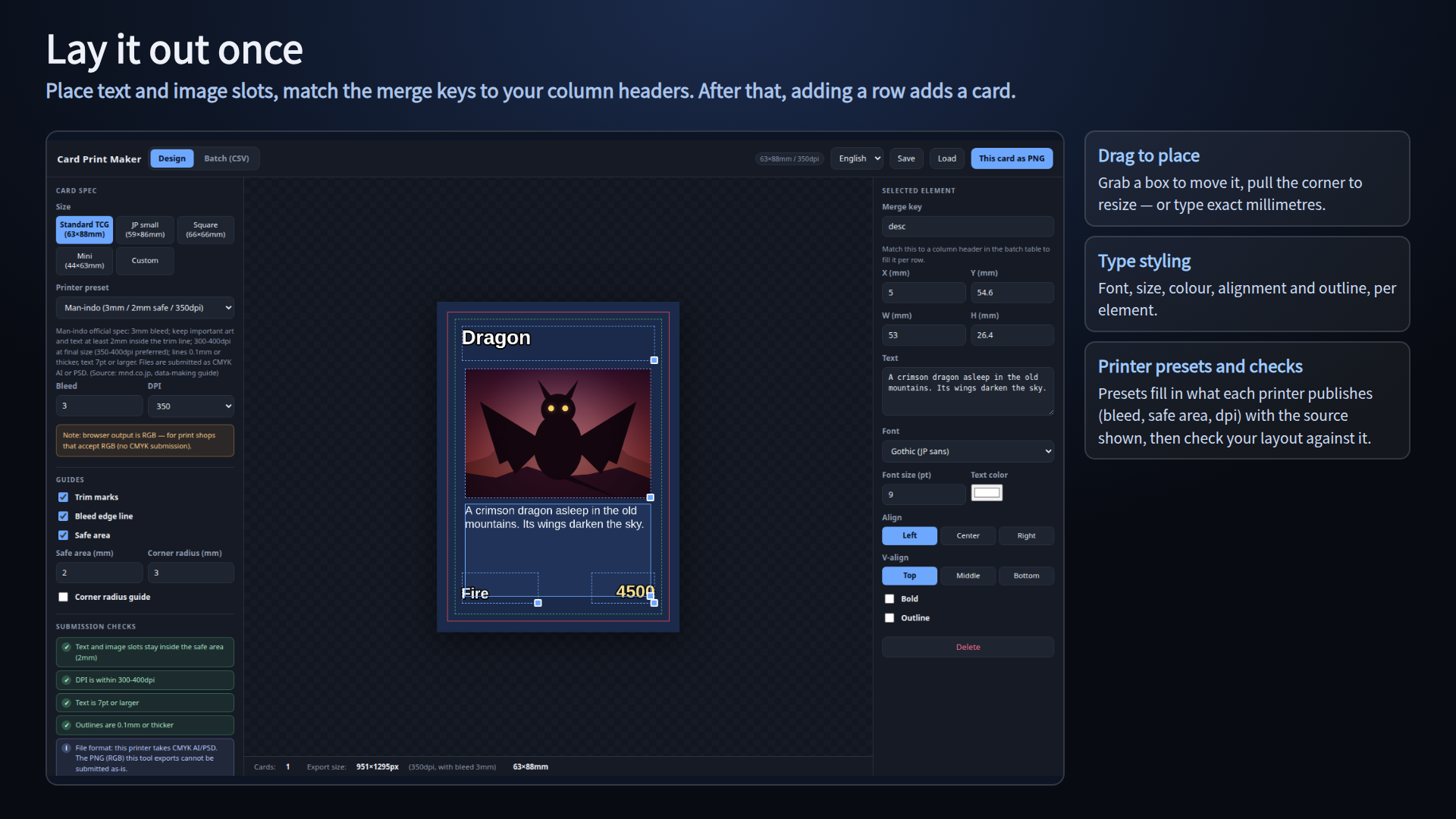
A batch tool for the boring half of making your own cards. Lay out one card,
paste in a table, and every row becomes a card: exported at the size including
bleed, with trim marks in the corners, and saved as a single ZIP.
Made for original TCGs, board game cards, price cards, business-card sized
cards - anything where the same layout repeats across dozens of cards. It is
not a drawing tool: bring the artwork you exported from Clip Studio,
Photoshop, Procreate, Aseprite or anything else.
One HTML file. No install, no account, no licence key, works offline. Just
double-click cardprint.html. Windows and Mac. English / Japanese.
=== Three steps ===
1. Double-click cardprint.html
2. Open the "Batch (CSV)" tab and press "Insert sample", then replace the
sample layout and table with your own
3. Press "All cards as ZIP" (or "This card as PNG" on the Design tab)
=== Card spec ===
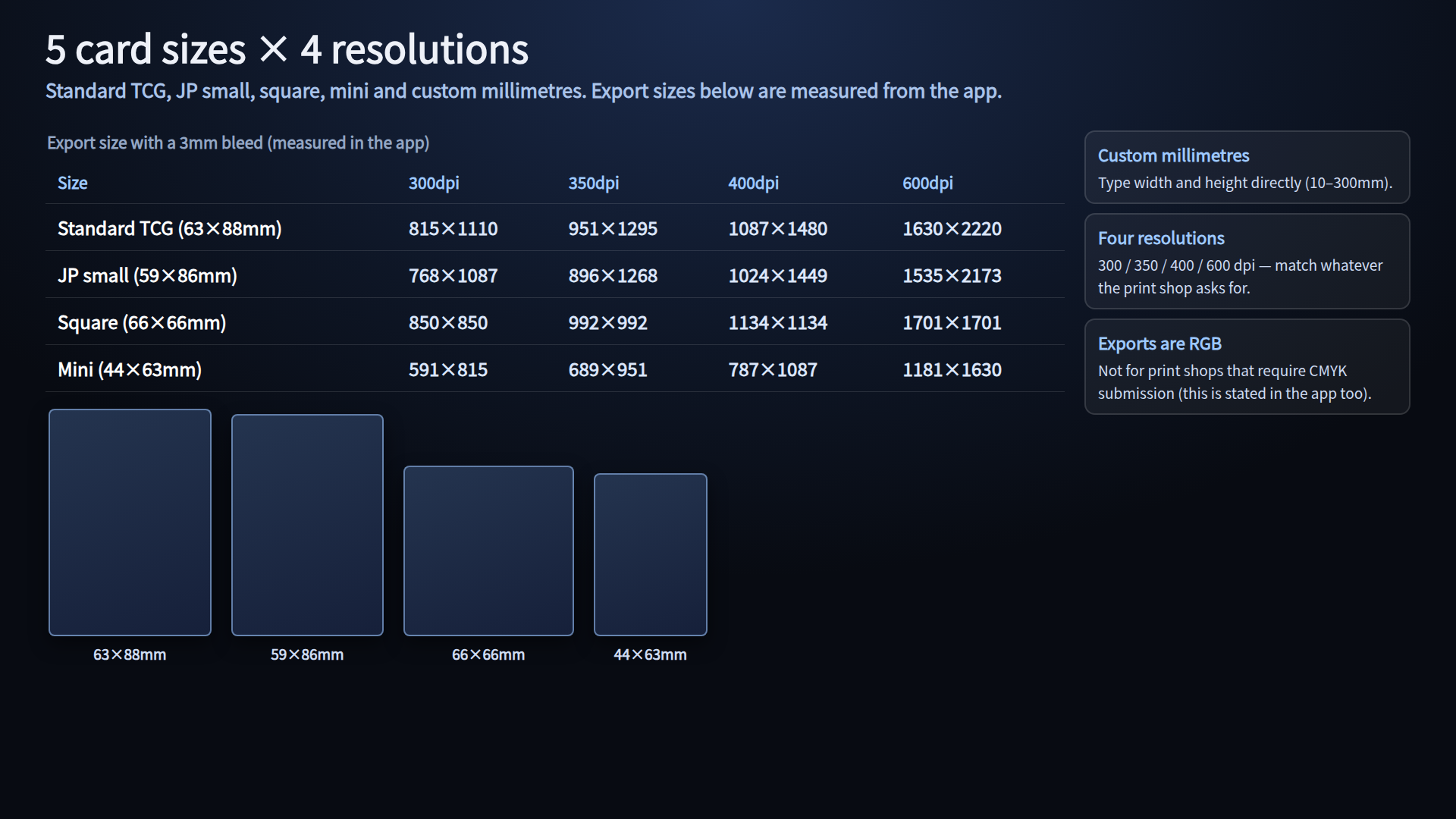
- Sizes: Standard TCG 63x88mm / JP small 59x86mm / Square 66x66mm /
Mini 44x63mm / Custom (type width and height, 10-300mm)
- Printer presets: Man-indo / PrintOn / Graphic (Comigra) / Custom. Picking one
fills in the numbers that printer publishes (bleed, safe area, dpi) and shows
those official values and the source on screen
- Man-indo: 3mm bleed / keep art 2mm or more inside the trim line /
300-400dpi at final size (350-400dpi preferred) / lines 0.1mm or thicker,
text 7pt or larger / submitted as CMYK AI or PSD (source: mnd.co.jp)
- PrintOn: 3mm bleed / keep text and art 3mm or more inside the trim line /
350dpi full colour, 600dpi mono (source: print-on.jp)
- Graphic: trading cards are 63x88mm and 59x86mm / 3mm corner radius /
template required (source: graphic.jp). Bleed and inner margin are not
published, so the common 3mm / 3mm are used
- Bleed 0-5mm in 0.5mm steps
- Safe area 0-10mm in 0.5mm steps
- 300 / 350 / 400 / 600 dpi
- Export size with a 3mm bleed at 350dpi (measured): Standard TCG 951x1295px,
JP small 896x1268px, Square 992x992px, Mini 689x951px
=== Print-ready by default ===
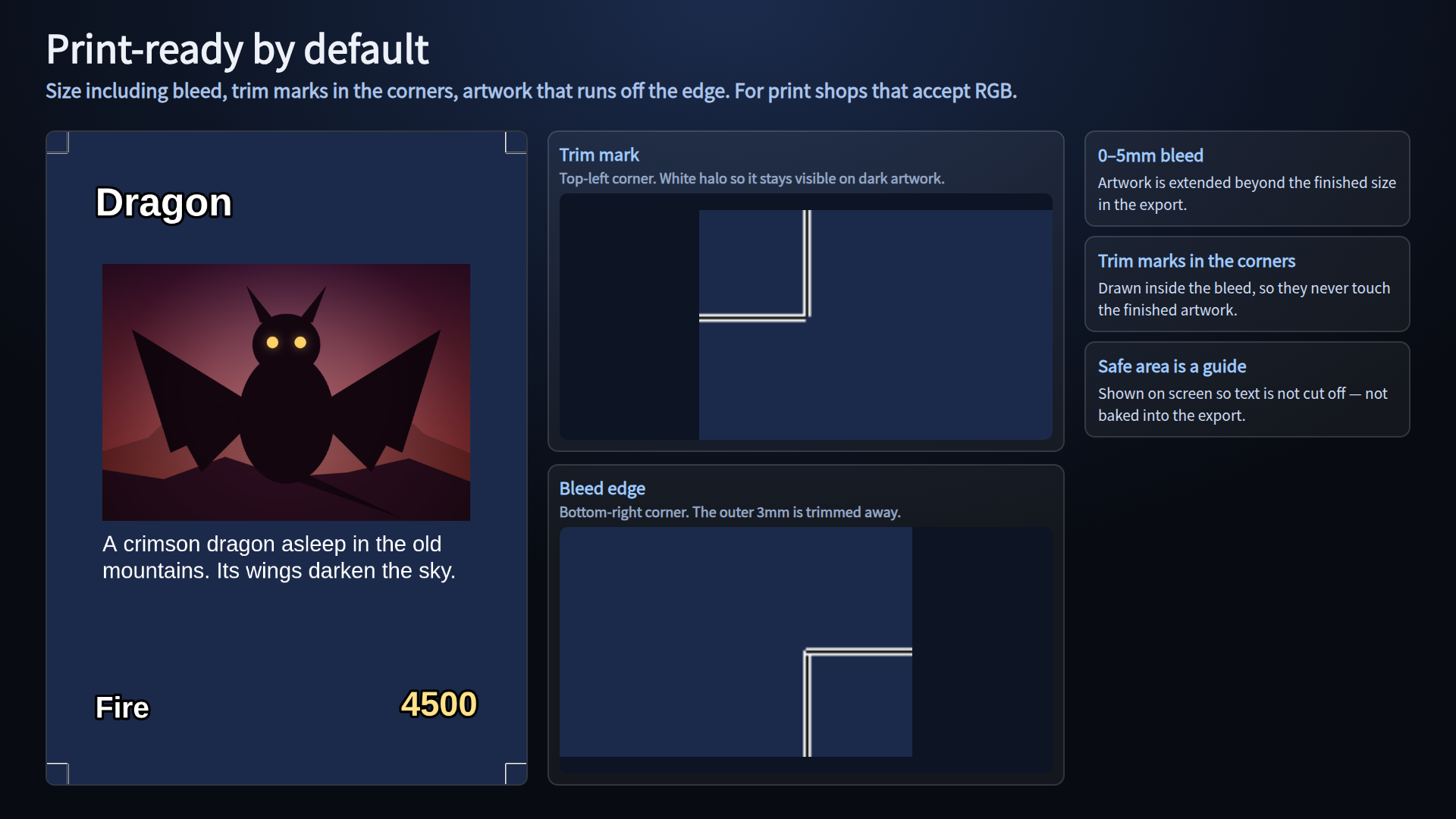
- Trim marks are included in the exported image. They are drawn only inside
the bleed - the part that gets cut off - so they never touch the finished
artwork. Black lines with a white halo, so they stay visible on dark art
- The bleed edge line, the safe area and the corner radius guide (0-10mm) are
on-screen guides only and are never baked into the export
- No trim marks are drawn when the bleed is 0mm
=== Submission checks ===
The checks compare the official values of the selected printer with what you
have placed. Only things that can be measured as numbers are checked (colour
and CMYK conversion are not).
- Text and image slots stay inside the safe area (it counts what sticks out)
- DPI is inside the official range (Man-indo 300-400, PrintOn 350-600)
- Text is at or above the minimum size (Man-indo 7pt)
- Outlines are at or above the minimum width (Man-indo 0.1mm; pt is converted
to mm before comparing)
- Format notes (Man-indo takes CMYK AI/PSD, so the PNG from this tool cannot be
submitted as-is; Graphic requires its own template)
- Items a printer does not publish are not shown for that printer
=== Layout (Design tab) ===
- Base colour, background image (cover / contain / stretch)
- "+ Add text" and "+ Add image slot". Drag a box to move it, pull the corner
to resize, or type exact millimetres (0.1mm steps)
- Text: five font families (sans-serif, serif, Mincho, Gothic, monospace),
size in pt, colour, align, vertical align, bold, outline (width and colour)
- Text wraps to the width of the box - per word for English, per character
for Japanese - and line breaks are kept
- Image slots: cover / contain / stretch, clipped to the box. You can also
drop a single image straight into a slot
=== Batch (mail merge) ===
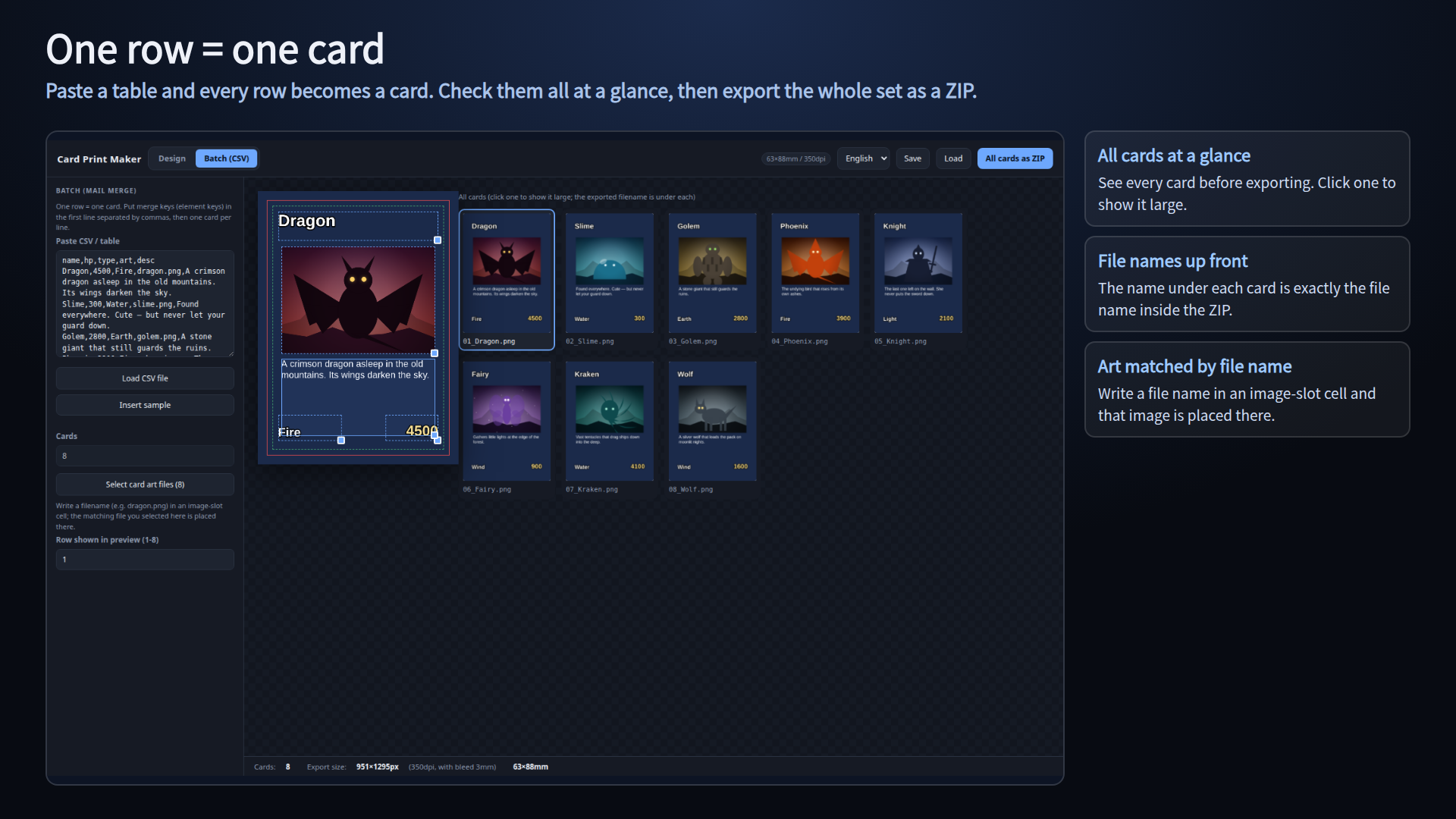
- First line = merge keys, one card per line after that. Comma or tab
separated, detected automatically, so you can paste straight from a
spreadsheet
- Quoted fields, commas and line breaks inside quotes are handled; blank
lines are ignored
- Or load a .csv / .tsv / .txt file
- Artwork: press "Select card art files", then write the file name
(e.g. dragon.png) in the image-slot column. Case-insensitive
- All cards in the table are shown as thumbnails. Click one to show it large.
The name under each card is exactly the file name inside the ZIP (the list
shows the first 120 cards; every row is still exported)
=== What you get ===
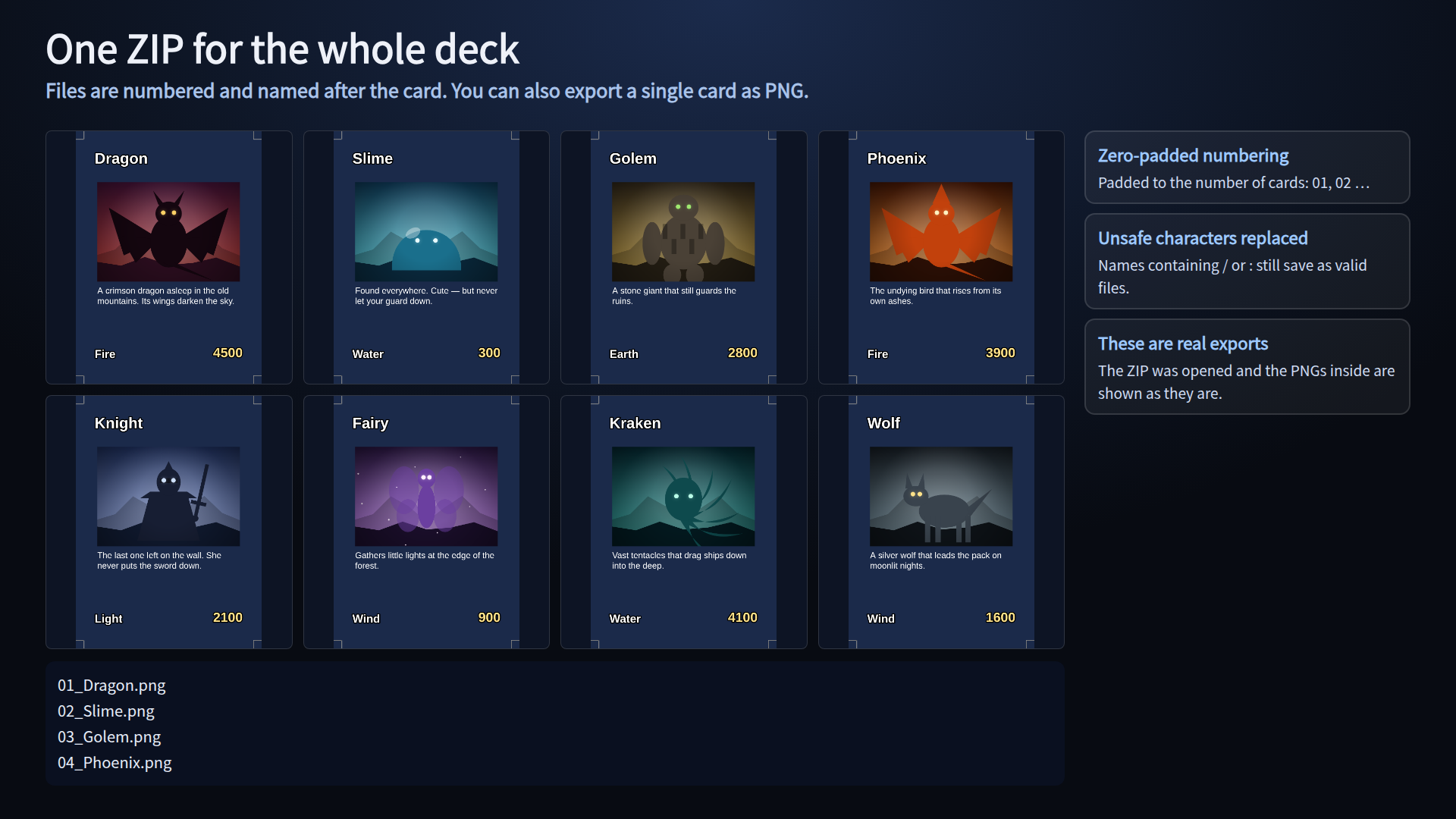
- cards.zip - file names are "zero-padded number + _ + card name + .png",
taken from the name column
- Characters that cannot be used in file names ( \ / : * ? " < > | ) are
replaced with _ , and non-ASCII names are stored correctly (UTF-8)
- cards.png - a single card, whatever is in the preview
- "Save" writes card-design.json (layout, base, background image and table)
and "Load" reads it back. Your work is also kept in the browser
=== Before you buy ===
- Exports are RGB PNG. CMYK submission is not supported - this is for print
shops that accept RGB data
- Trim marks are drawn inside the bleed. If your printer needs a separate
margin for them, turn the trim marks off
- No PDF export, no imposition (tiling several cards onto A4), no card backs,
no rounded-corner processing
- Bleed, resolution and format requirements differ between print shops -
check your printer's guide before submitting. Every value can be changed
- Best used on a desktop or laptop
=== Included ===
cardprint.html (the whole tool, one file), English and Japanese readmes,
English and Japanese terms.
Commercial use is fine: sell the cards you print. Redistributing or reselling
the file itself is not. Your images never leave your machine - the tool makes
no outside connections. No credit required.
Purchase
In order to download this tool you must purchase it at or above the minimum price of $8 USD. You will get access to the following files:
Leave a comment
Log in with itch.io to leave a comment.