Poll Board - 12 Voting Result Overlays for OBS
A downloadable tool
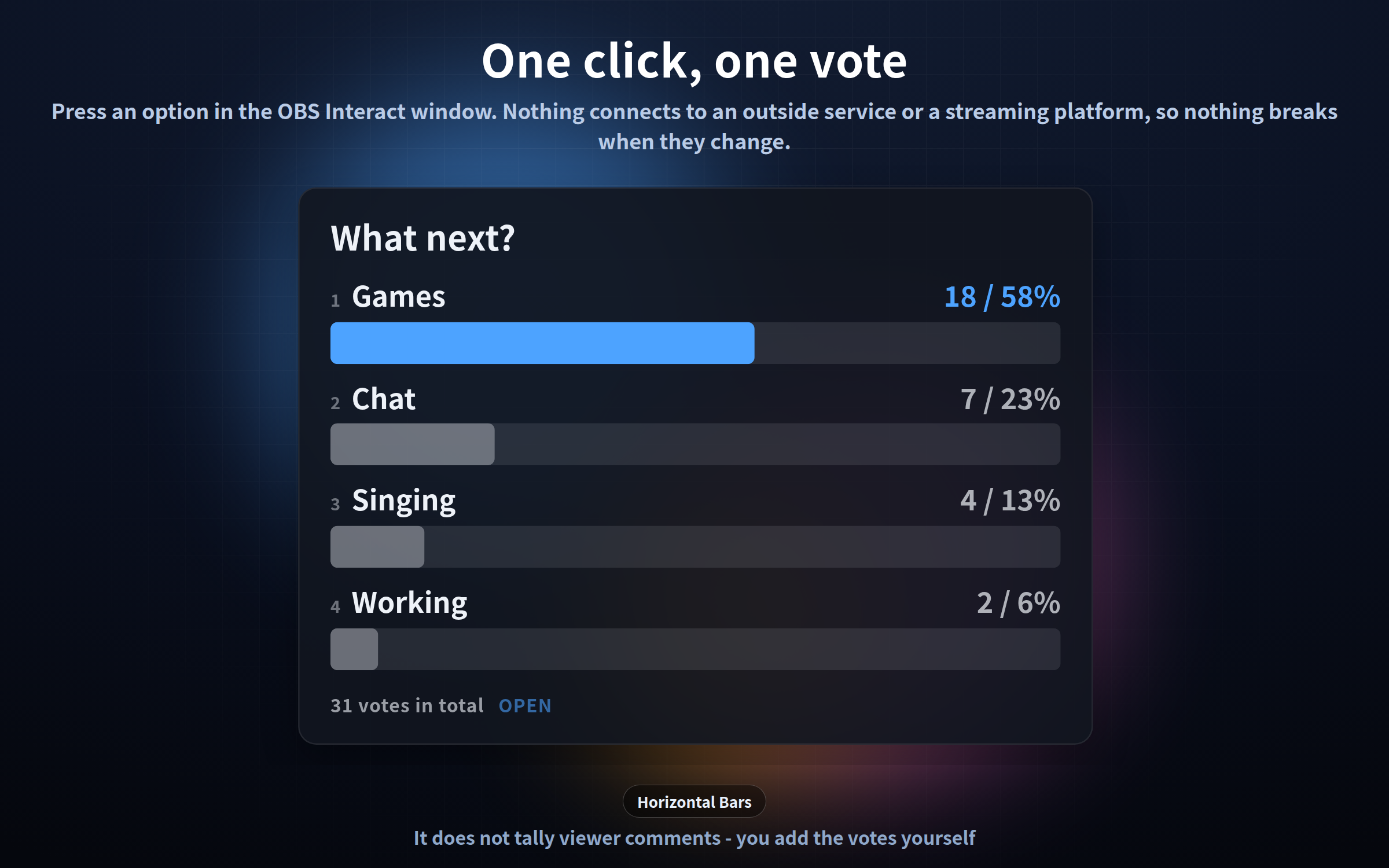
An on-screen poll result for your stream overlay. List the options, and the bars grow as the votes come in. Twelve looks, identical features.
## Read this first
**This tool does not read chat, and it does not tally comments automatically.**
You add the votes yourself: click an option inside the OBS "Interact" window, or press 1-9 on the keyboard.
If you are looking for something that counts chat messages by itself, this is not it. Please check before you buy.
In exchange, it never connects to an outside service or a streaming platform. No account, no API key, no OAuth to re-authorise, nothing to break when a platform changes its rules. One HTML file, and it keeps working.
One single HTML file each. No install, no account, works completely offline. Transparent background. English / Japanese.
## What it does
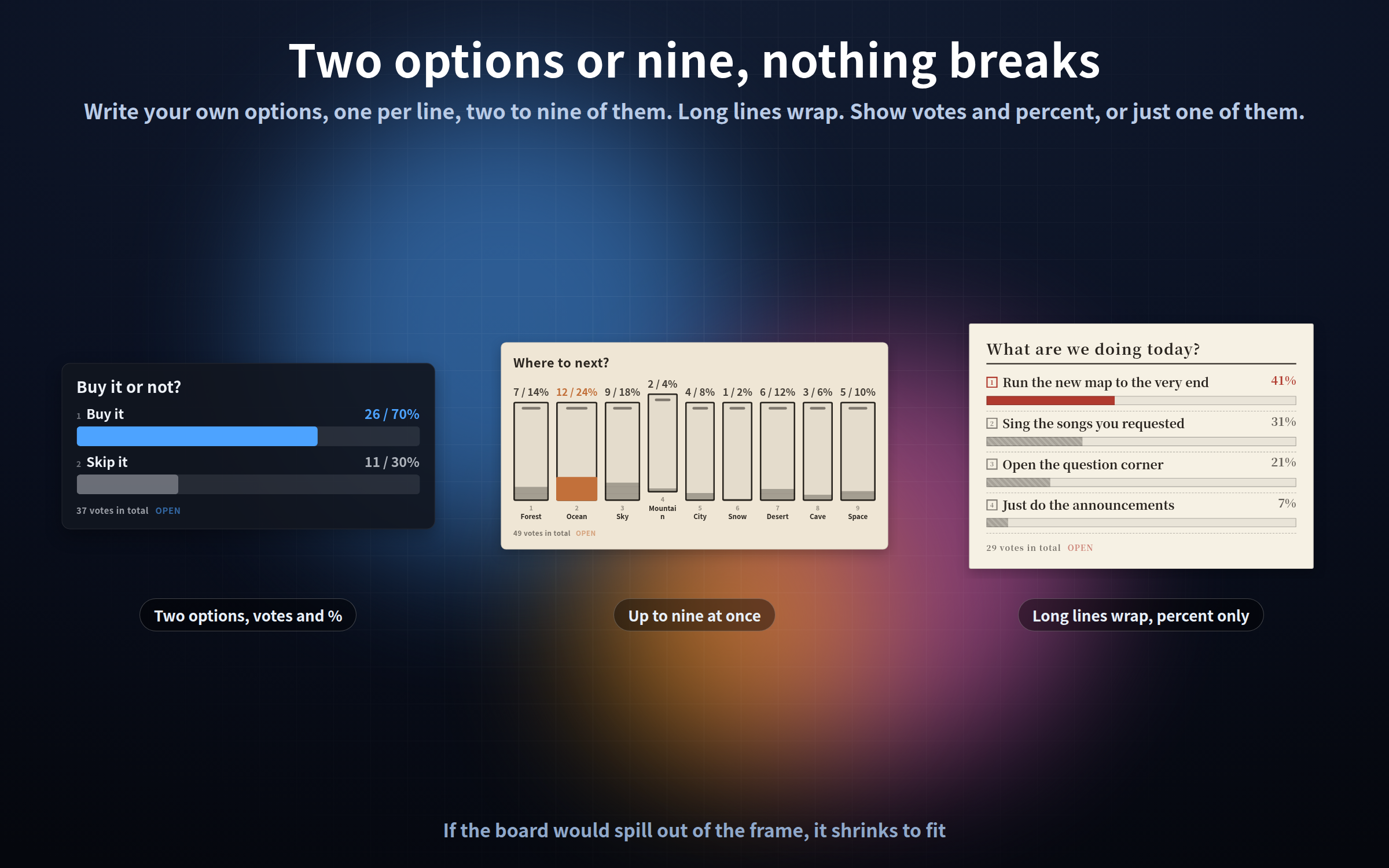
- Write your own options - one per line, two to nine of them. Long lines wrap
- Click or press 1-9 to add a vote. Hold Shift to take one back
- Show the vote count and the percentage, or just one of them
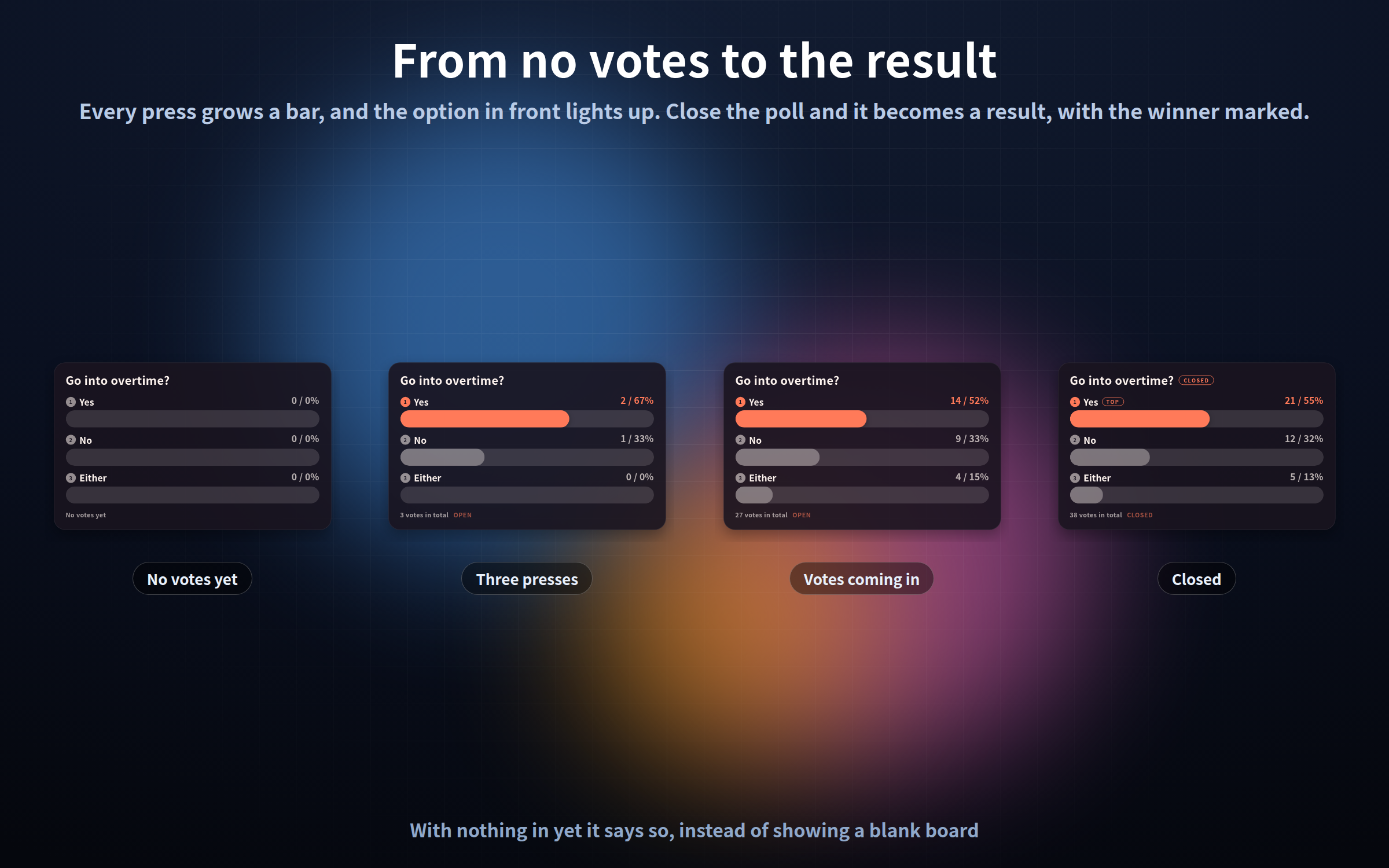
- The option in front lights up in the accent colour (a tie lights up both)
- Close the poll and it becomes a result: the bars stop, and the winner is marked
- With nothing in yet it still reads as a board, saying "No votes yet"
- One press can add 1, 5, 10 - handy when you read chat yourself and enter them in batches
## Where the votes live
The votes are stored inside the OBS browser. They survive a source refresh, a scene change and an OBS restart.
Clearing the OBS cache clears them, though. So there are three ways to get them back:
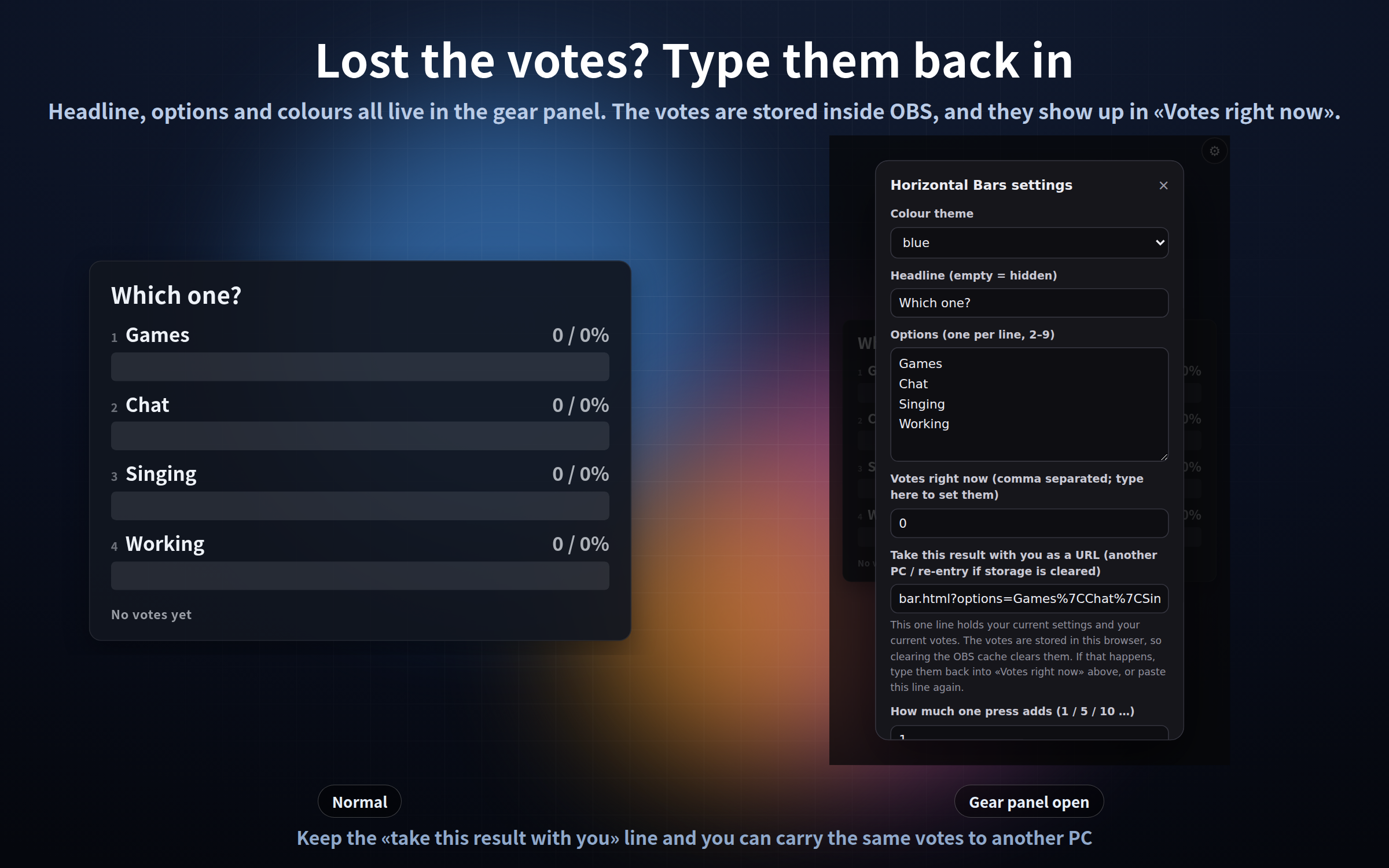
- Type the numbers, comma separated, into "Votes right now" in the gear panel and save
- Paste the line from "Take this result with you as a URL" back into the browser source URL box
- Put ?votes=18,7,4,2 in the URL
Open the gear and the current votes are already sitting in the field. Keep that one line somewhere and you can carry the same poll to another PC.
## The twelve designs
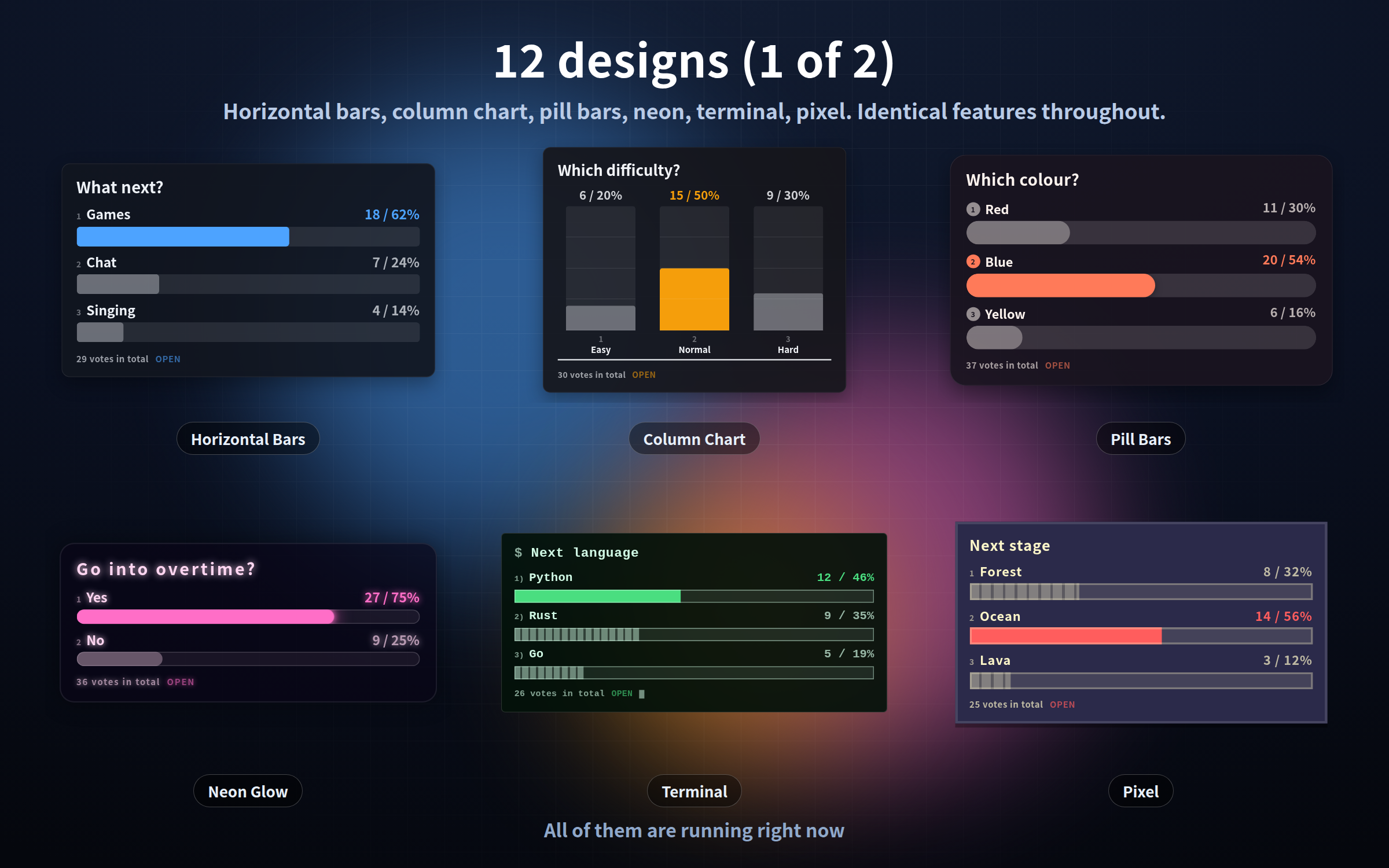
- **bar** - horizontal bars; a bar under each label, the plainest one
- **column** - a column chart with grid lines and a base axis
- **pill** - fully rounded bars with round number badges
- **neon** - text and bars glow; the leading bar pulses slowly
- **terminal** - a CLI look; bars are runs of blocks and the cursor blinks
- **pixel** - nothing rounded; the bars grow in visible steps
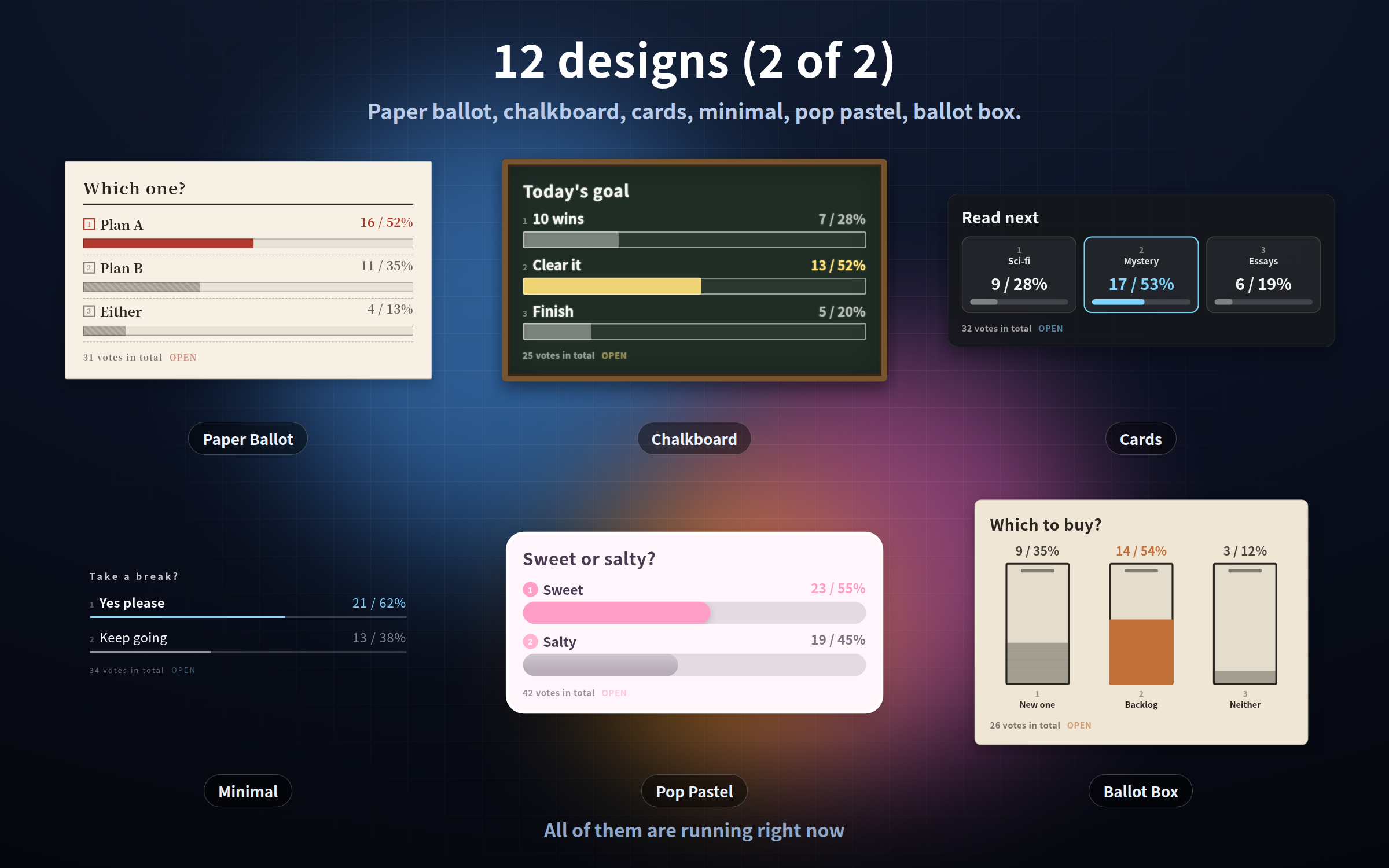
- **paper** - a paper ballot: serif type, ruled lines, square tick boxes
- **chalk** - a chalkboard in a wooden frame, slightly chalky edges
- **card** - one card per option; the number leads, a thin bar sits below
- **minimal** - no plate at all: hairlines and text
- **pop** - a bright pastel plate with a white rim and thick round bars
- **ballot** - upright ballot boxes that fill with stacked slips
column, card and ballot lay the options side by side; the other nine stack them as horizontal bars.
## Adding votes
Right-click the source in the OBS Sources list, choose "Interact", then:
- Click an option: +1. Shift + click: -1
- Keys 1-9: +1 on that option. Shift + 1-9: -1
- Enter: close the poll, or reopen it
- 0: reset every vote. One press is not enough - it asks, and you press 0 again
- S key: open the gear panel
Your live output never receives clicks, so nothing moves by accident on stream.
## The gear button
1. Right-click it in the OBS Sources list and choose "Interact"
2. Move the mouse over it - a gear appears top right (or press the S key)
3. Change what you like and press "Save & close"
The gear is invisible unless the mouse is over it, so it never shows on stream. Settings are saved and survive an OBS restart. "Reset settings" puts everything back the way it shipped - including the votes. Add ?key=a or ?key=b to run separate polls in separate scenes.
## Settings shared by all twelve
?options= your options / ?votes= the votes right now / ?step= how much one press adds / ?show= votes, percent or both / ?bar= share of all votes or leader fills the bar / ?closed=on / ?title= the headline / ?keys=off / ?foot=off / ?pos= nine places on screen / ?scale= size 0.3-4 / ?alpha= plate opacity 0-100 / ?anim=off / ?theme= colour theme (3-4 per design) / ?color= ?accent= ?bgcolor= your own colours / ?lang= / ?key= / ?mode=stream for a display-only copy.
## Please note
- It does not tally viewer comments. You add the votes by hand
- There is no integration with any app, API or streaming platform
- No sound; this is a display only
- The votes live in this OBS on this PC. Clearing the OBS cache clears them
- Your live output cannot be clicked. Open "Interact" to add votes
- Two to nine options; with one option the built-in options come back
- Percentages are rounded, so they can add up to 99% or 101%
## What is in the download
Twelve HTML files, a read-me in English and Japanese, and the terms of use.
Tested in Chrome and Edge. The OBS Studio 28+ browser source is Chromium, so it runs the same way there, and in other apps with a browser source such as Streamlabs. Nothing is ever sent anywhere - no web fonts, no analytics, no internet connection needed. Text and bars are real HTML shapes, so they stay sharp at any size, and only the current votes are on screen, so memory does not grow when you leave it running.
Found a bug or want a feature? Message me.
Purchase
In order to download this tool you must purchase it at or above the minimum price of $3 USD. You will get access to the following files:
Leave a comment
Log in with itch.io to leave a comment.