Stream Clock Collection - 4 Packs, 50 Clock Designs for OBS
A downloadable tool
Four clock packs in one download: 50 clock designs for your OBS overlay.
Every file is a single HTML file. Drop one into an OBS "Browser" source and it runs. No install, no account, no API key, nothing to sign up for, and nothing is ever sent out.
These are not still images or GIFs. Every clock is drawn from lines while it runs, so it stays sharp at any size, weighs almost nothing, and has no loop seam. Text, colours and size all change from a gear button on the widget itself.
Each pack sits in its own folder with its own manual, in English and Japanese.
━━━━━━━━━━━━━━━━━━
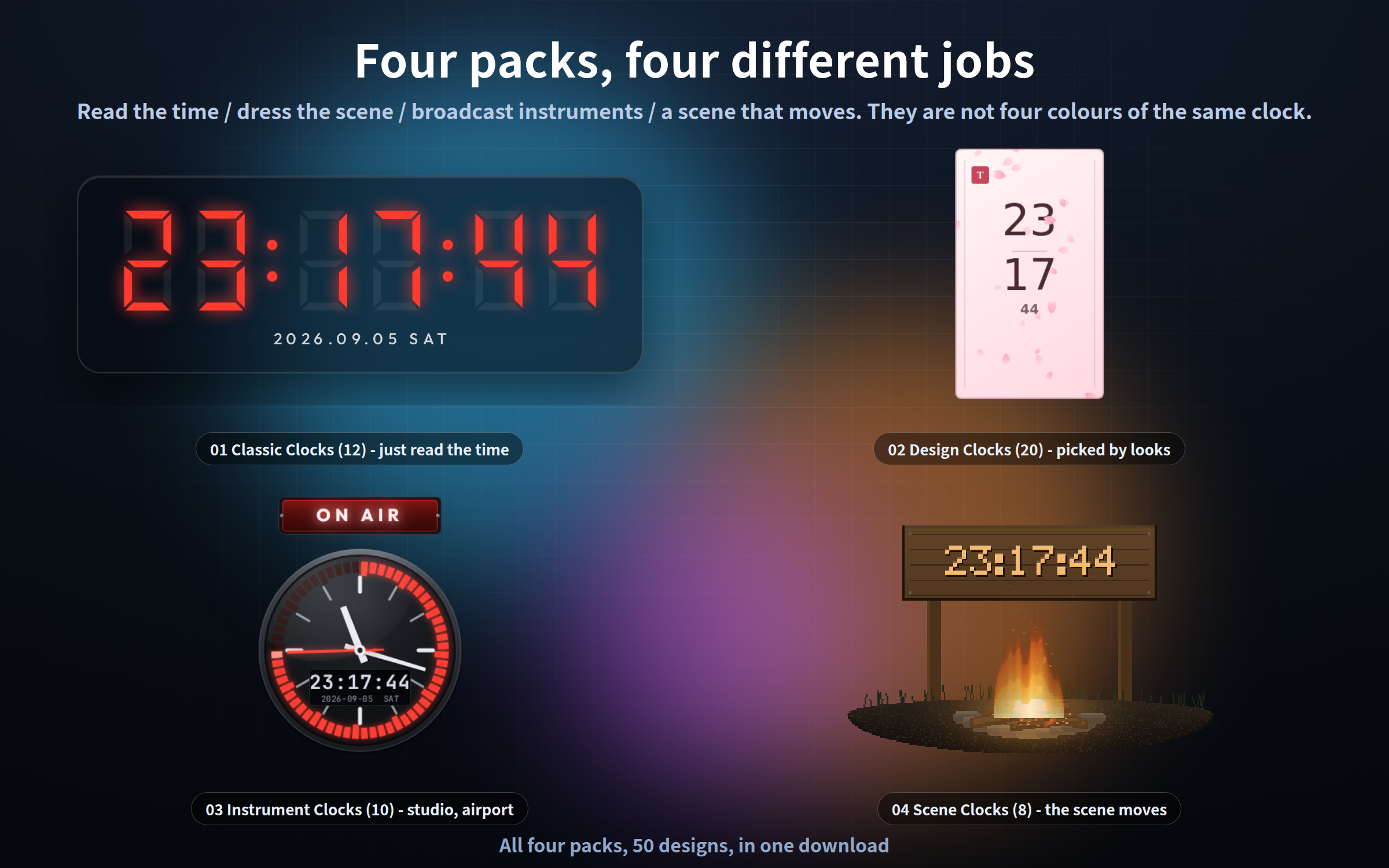
FOUR PACKS, FOUR DIFFERENT JOBS
━━━━━━━━━━━━━━━━━━
They are not four colours of the same clock.
- 01 Classic Clocks - a clock a viewer reads the time from
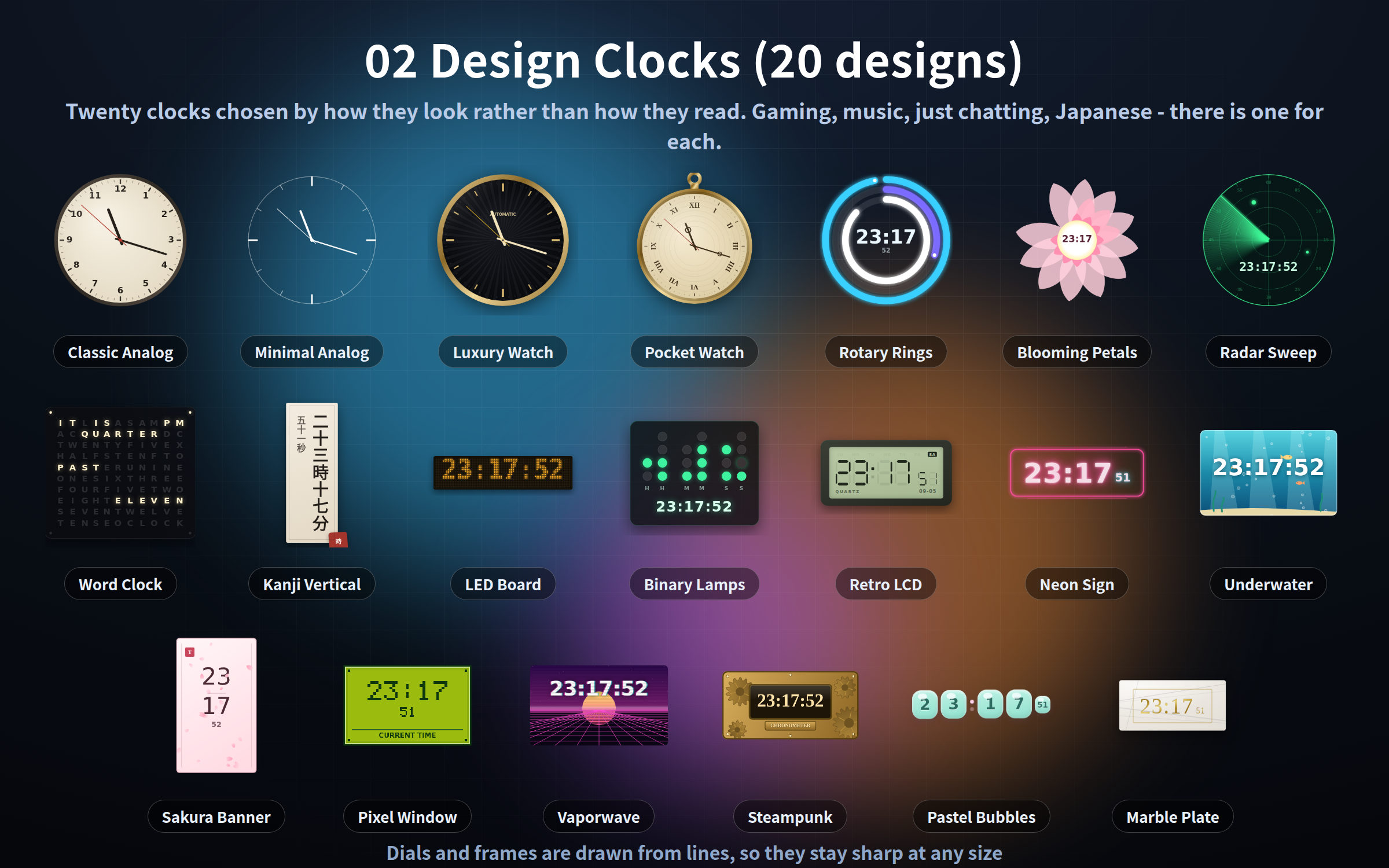
- 02 Design Clocks - chosen for how they look, not how they read
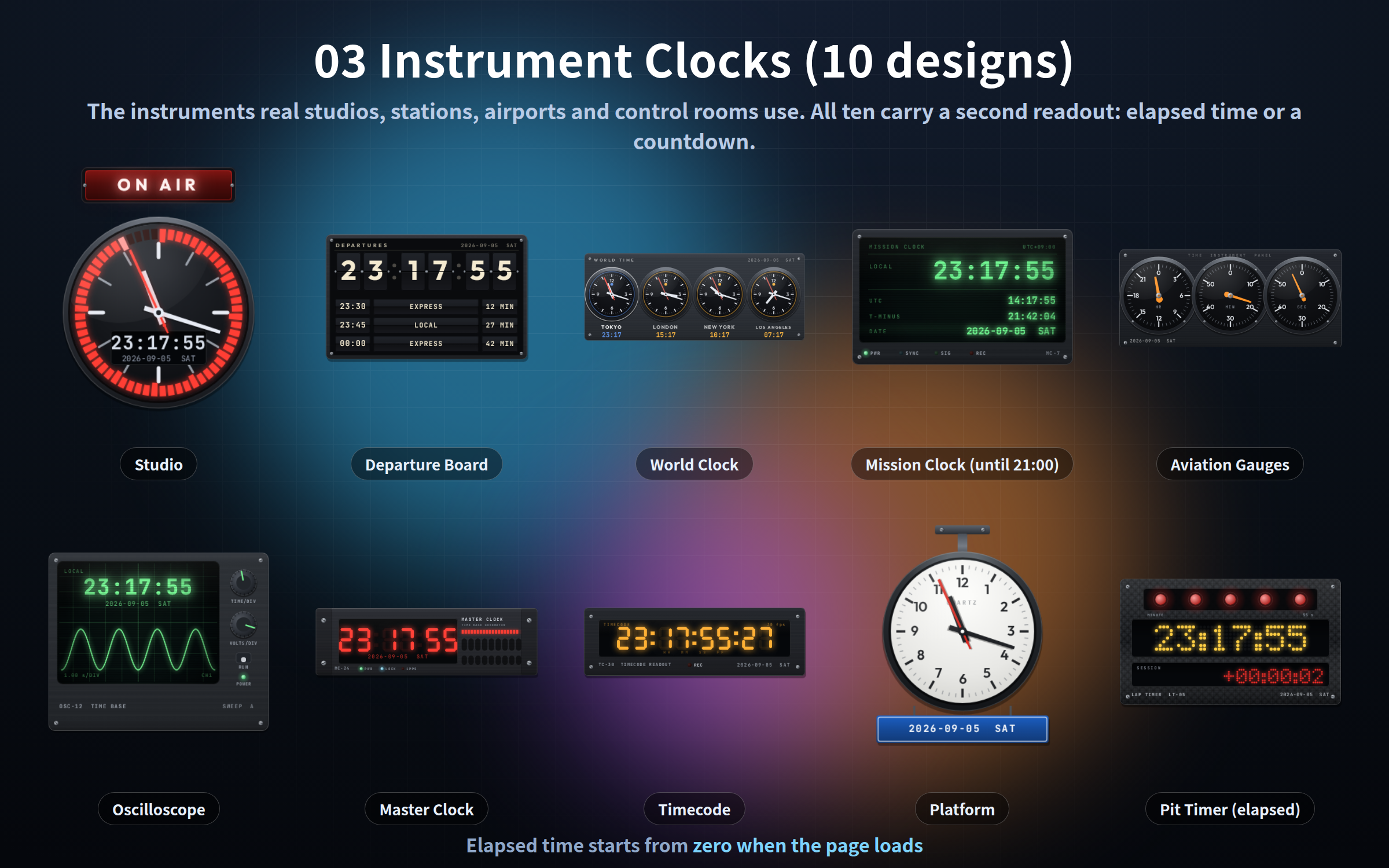
- 03 Instrument Clocks - the instruments studios, stations and control rooms use
- 04 Scene Clocks - a scene with a clock in it, rather than a clock on its own
Just chatting takes a classic, gaming takes a design clock, an announcement stream takes an instrument, and a work or music stream takes a scene.
━━━━━━━━━━━━━━━━━━
WHAT IS INSIDE (4 packs / 50 HTML files)
━━━━━━━━━━━━━━━━━━
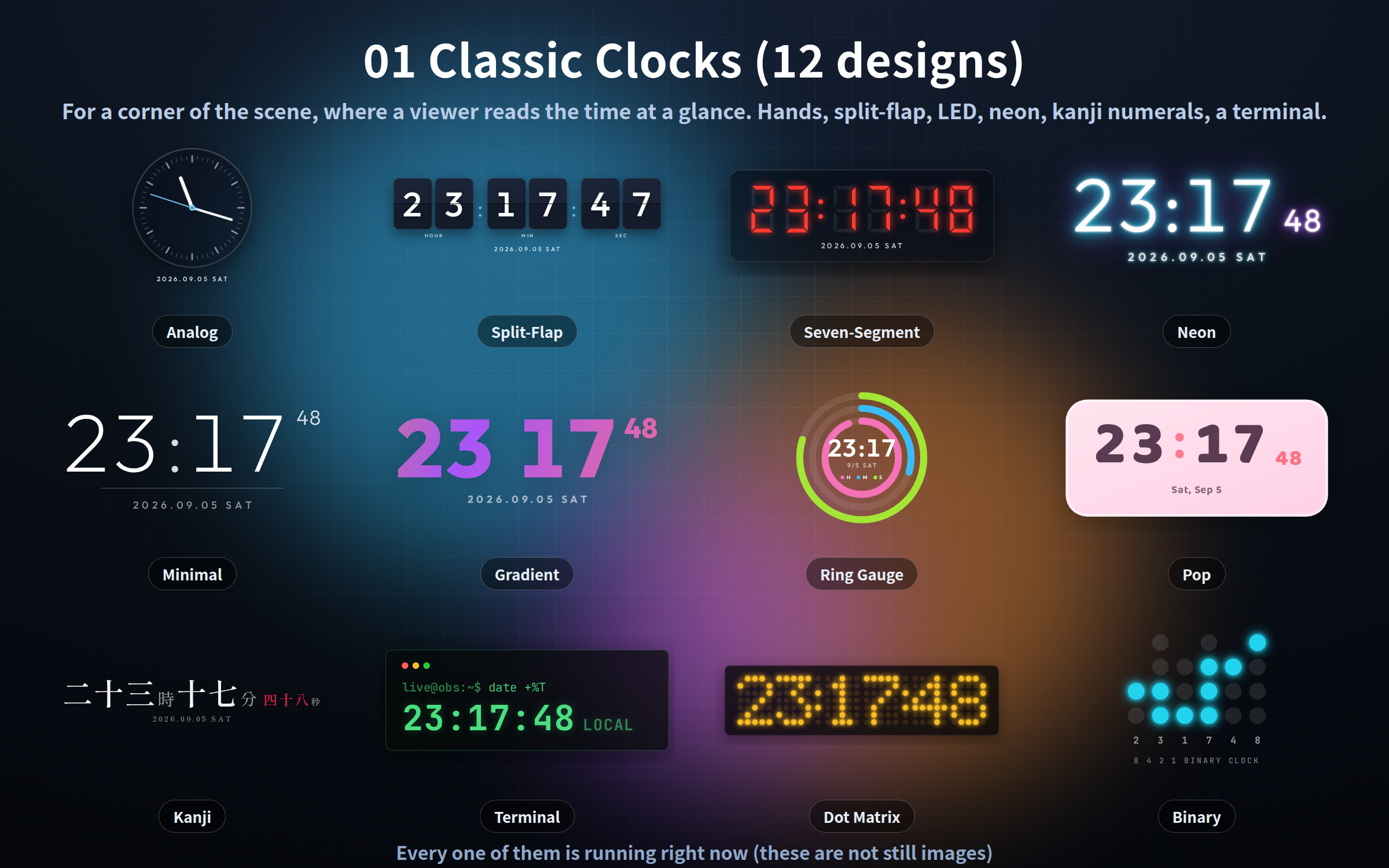
01_Classic-Clocks (12 designs)
Analog, split-flap, seven-segment LED, neon, minimal, gradient, ring gauge, pop, kanji numerals, terminal, dot matrix, binary.
02_Design-Clocks (20 designs)
Classic analog, minimal analog, luxury watch, pocket watch, rotary rings, blooming petals, radar sweep, word clock, vertical kanji, LED board, binary lamps, retro LCD, neon sign, underwater, sakura banner, pixel window, vaporwave, steampunk, pastel bubbles, marble plate.
03_Instrument-Clocks (10 designs)
Studio clock with an ON AIR lamp, edit-suite timecode, rack master clock, split-flap departure board, platform clock, airport world clock, mission clock, three-dial aviation gauge, oscilloscope, pit lap timer.
All ten carry a second readout: elapsed time, or a countdown to a target time. A "starting at 21:00" standby screen is just a clock you placed.
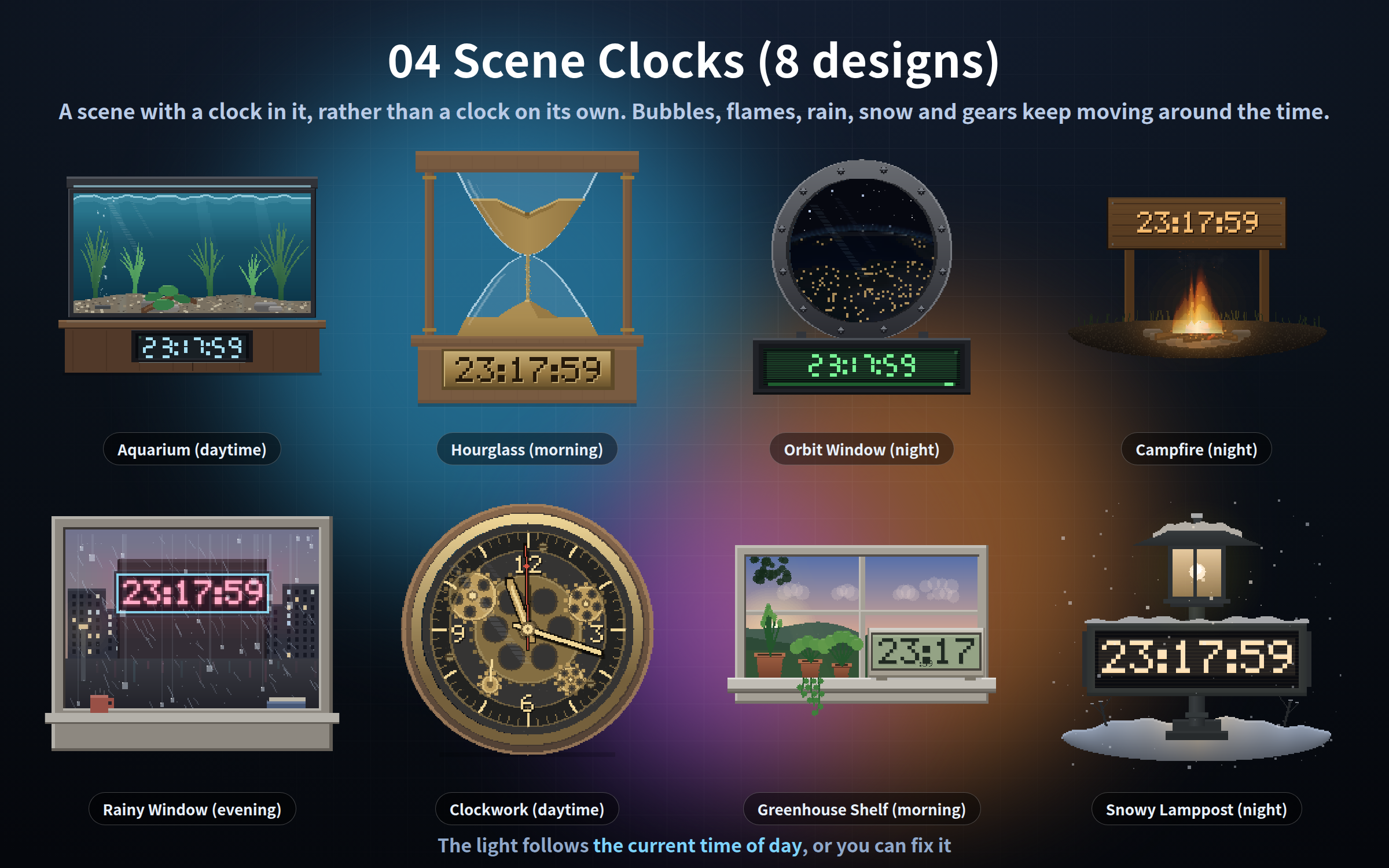
04_Scene-Clocks (8 designs)
Aquarium, hourglass, space-station window, campfire, rainy window, clockwork gears, greenhouse shelf, snowy lamppost.
The light in each scene follows the current time of day (morning, daytime, evening, night). You can also fix it.
━━━━━━━━━━━━━━━━━━
SETUP (30 SECONDS)
━━━━━━━━━━━━━━━━━━
1. In OBS: Sources -> "+" -> Browser
2. Tick "Local file" and choose the .html you want
3. Enter the width and height (each folder's manual suggests a size)
The background is transparent, so it sits straight on your scene.
━━━━━━━━━━━━━━━━━━
A GEAR PANEL IN ALL 50 FILES
━━━━━━━━━━━━━━━━━━
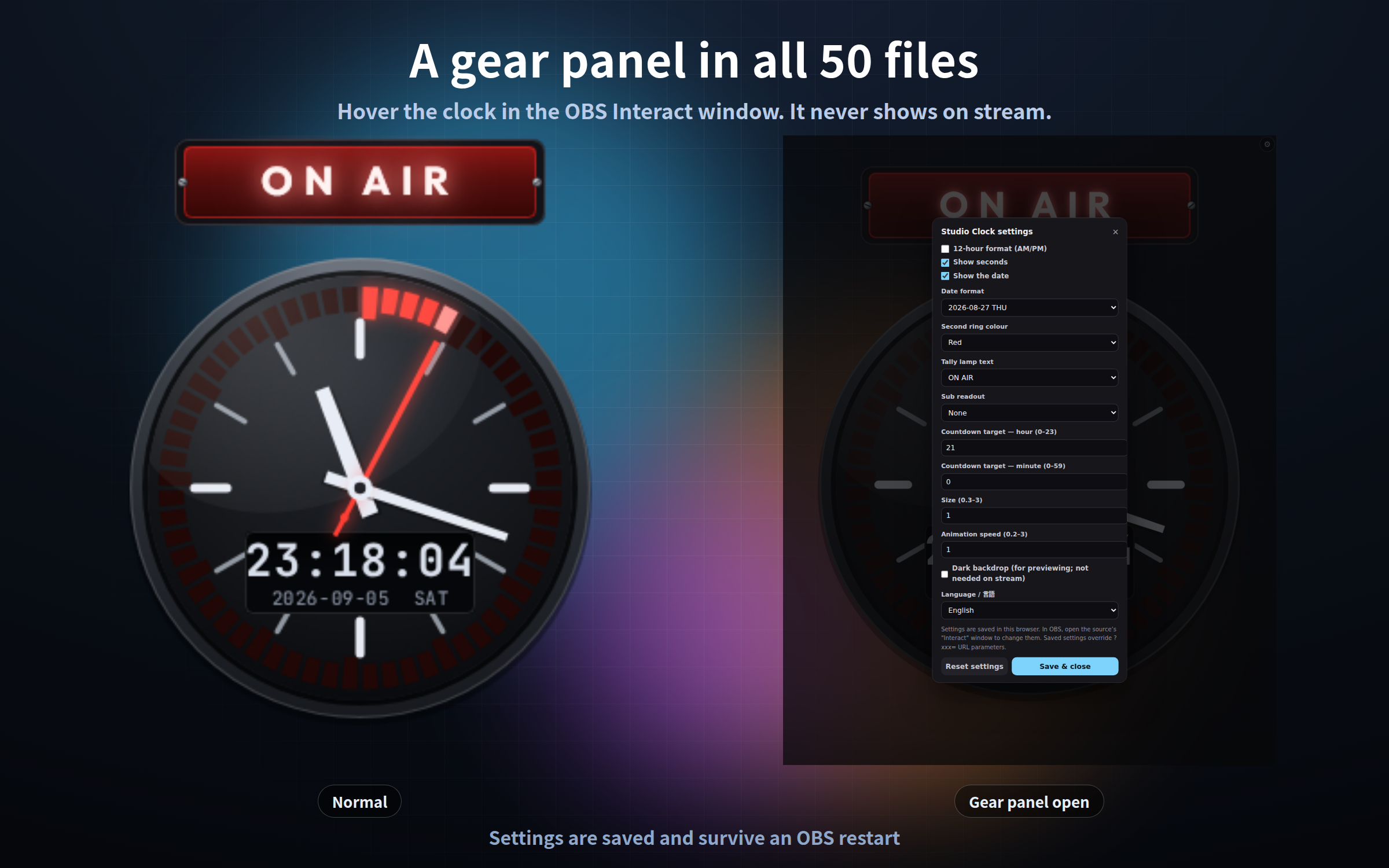
- Right-click the source in OBS, choose "Interact", hover the picture, and a gear appears
- 12h/24h, seconds, the date, colours and size all change without editing a URL
- The gear is invisible the rest of the time, so it never shows on stream (press S if you cannot find it)
- Settings are saved and survive an OBS restart
- "Reset settings" puts everything back to how it shipped
━━━━━━━━━━━━━━━━━━
URL PARAMETERS
━━━━━━━━━━━━━━━━━━
?lang=ja / ?lang=en Display language (follows your browser if unset) - all 50
?key=a Separate the saved settings - all 50
?mode=stream Never show the gear - folders 03 and 04 (18 files)
Colours, sizes and readouts differ by pack and are all listed in each folder's manual.
━━━━━━━━━━━━━━━━━━
WHAT IT DOES NOT DO
━━━━━━━━━━━━━━━━━━
- No sound effects (these are visual only)
- Chat and viewer comments are never read
- No integration with streaming platforms, music apps or calendars
- The time comes from your own PC clock. No time server is contacted
- In folder 03, "elapsed" counts from zero when the page loads, not from when your stream started
━━━━━━━━━━━━━━━━━━
IF YOU ALREADY OWN SOME OF THESE
━━━━━━━━━━━━━━━━━━
The files are the same ones sold separately in this shop, byte for byte. If you already own one of those packs, that part overlaps.
The shop's "OBS Stream Widgets (28)" bundle also contains four of the designs in folder 01 (analog, split-flap, seven-segment LED, neon). The other 46 designs are not in it.
━━━━━━━━━━━━━━━━━━
INCLUDED
━━━━━━━━━━━━━━━━━━
- Four clock packs (50 HTML files, one folder per pack)
- A manual for each pack (English / Japanese)
- A manual for the whole collection (English / Japanese)
- Terms of use (English / Japanese)
━━━━━━━━━━━━━━━━━━
REQUIREMENTS AND NOTES
━━━━━━━━━━━━━━━━━━
- Tested in Chrome and Edge. The OBS Studio 28+ browser source is Chromium, so it runs the same way there, and in other apps with a browser source such as Streamlabs
- No outside connection at all (no internet needed, no web fonts)
- Fonts come from your own PC
- Dials and digits are drawn from lines, so they stay sharp at any size
- Each frame is computed from the current time, so memory does not grow when you leave one running all day
- Fine for streaming and for commercial use (see the included terms)
Purchase
In order to download this tool you must purchase it at or above the minimum price of $4 USD. You will get access to the following files:
Leave a comment
Log in with itch.io to leave a comment.