Time & Progress Bundle - 4 Packs, 42 Designs for OBS
A downloadable tool
Bought separately these four are $8.00. Together they are $3.50.
Four packs of stream widgets that show how much is LEFT and how far you have COME, collected into one download: 42 designs in total. Every one is a single HTML file. Point an OBS "Browser" source at it and it runs. No install, no account, no API key, no subscription, and nothing is ever sent out.
They are running widgets drawn in code, not stills or GIFs, so they stay sharp at any size, weigh almost nothing and never show a loop seam. Text, colours and size are all changed from a gear button on the widget itself.
Each pack sits in its own folder with its own manual in Japanese and English.
━━━━━━━━━━━━━━━━━━
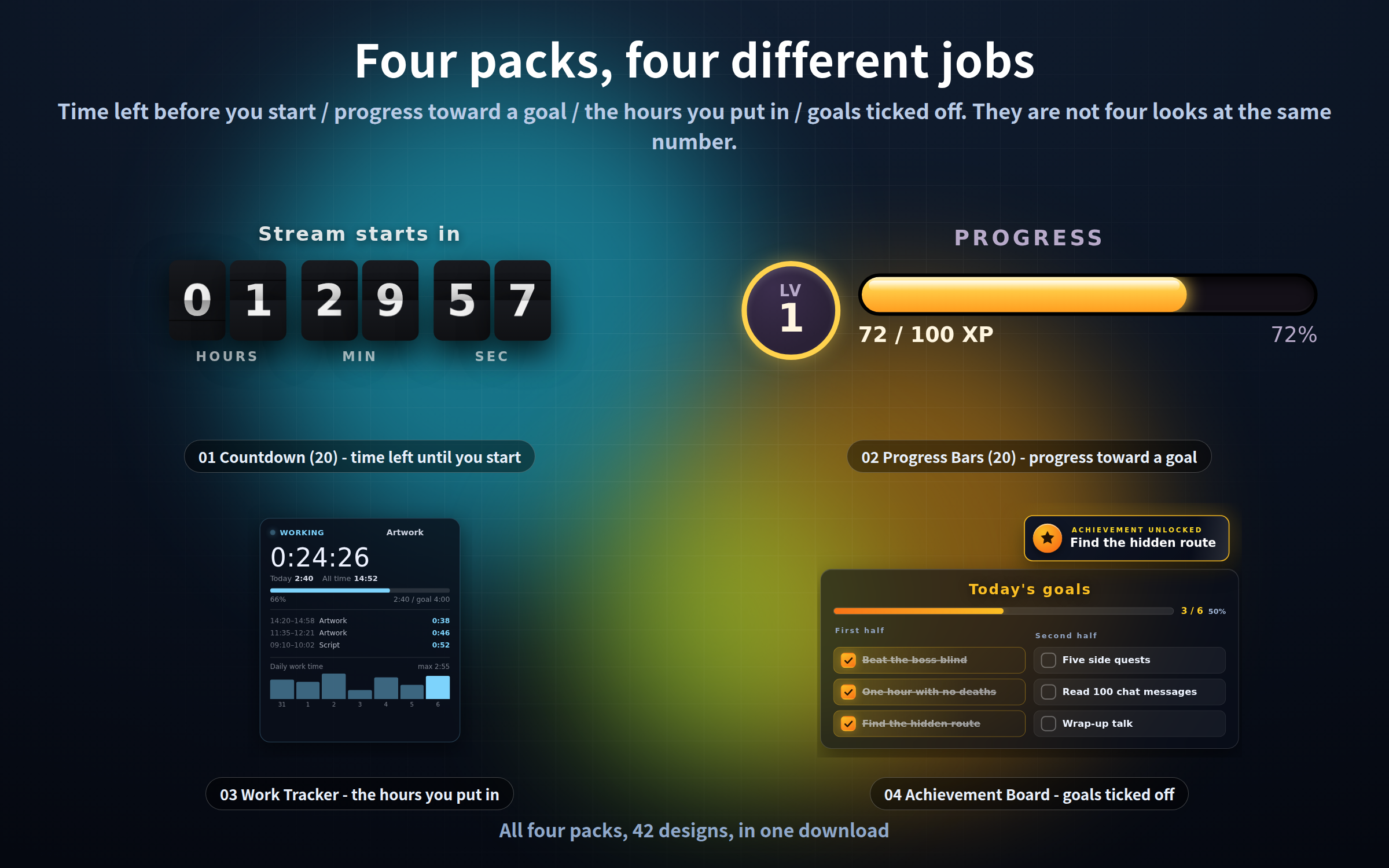
The four are not four looks at the same number
━━━━━━━━━━━━━━━━━━
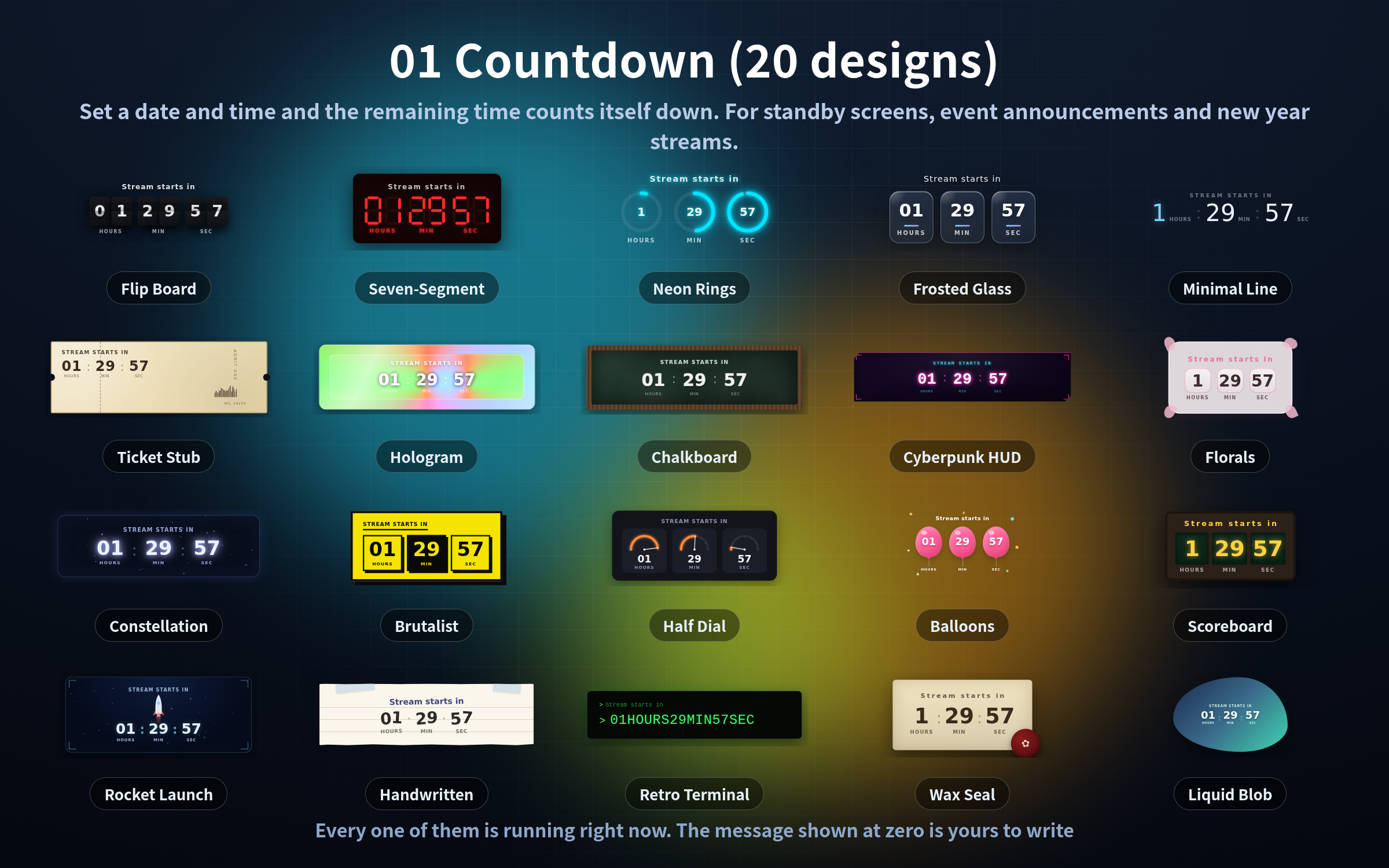
・01 Countdown - waiting for a fixed clock time. It reaches zero on its own
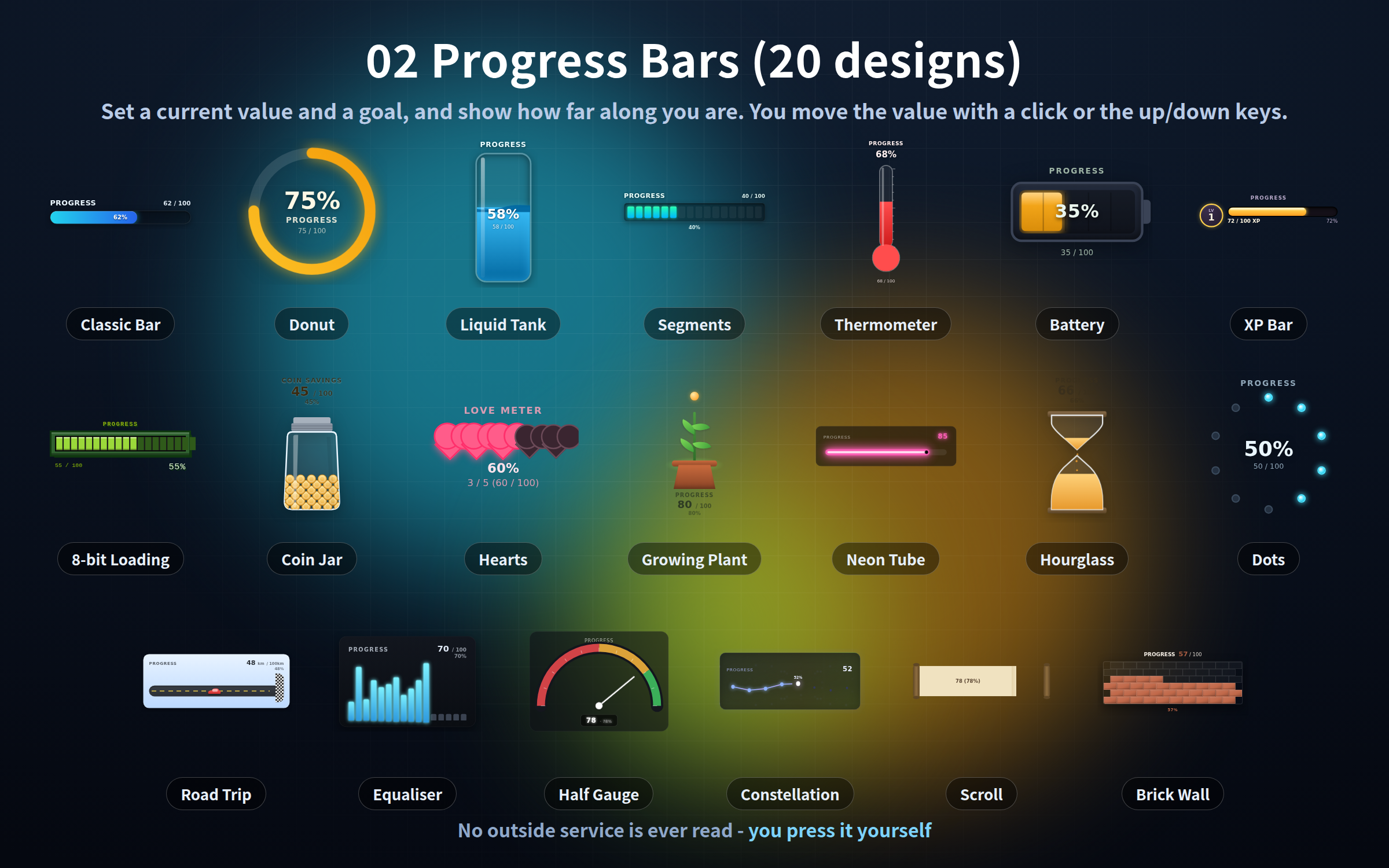
・02 Progress Bars - one number climbing toward a goal. You move the value yourself
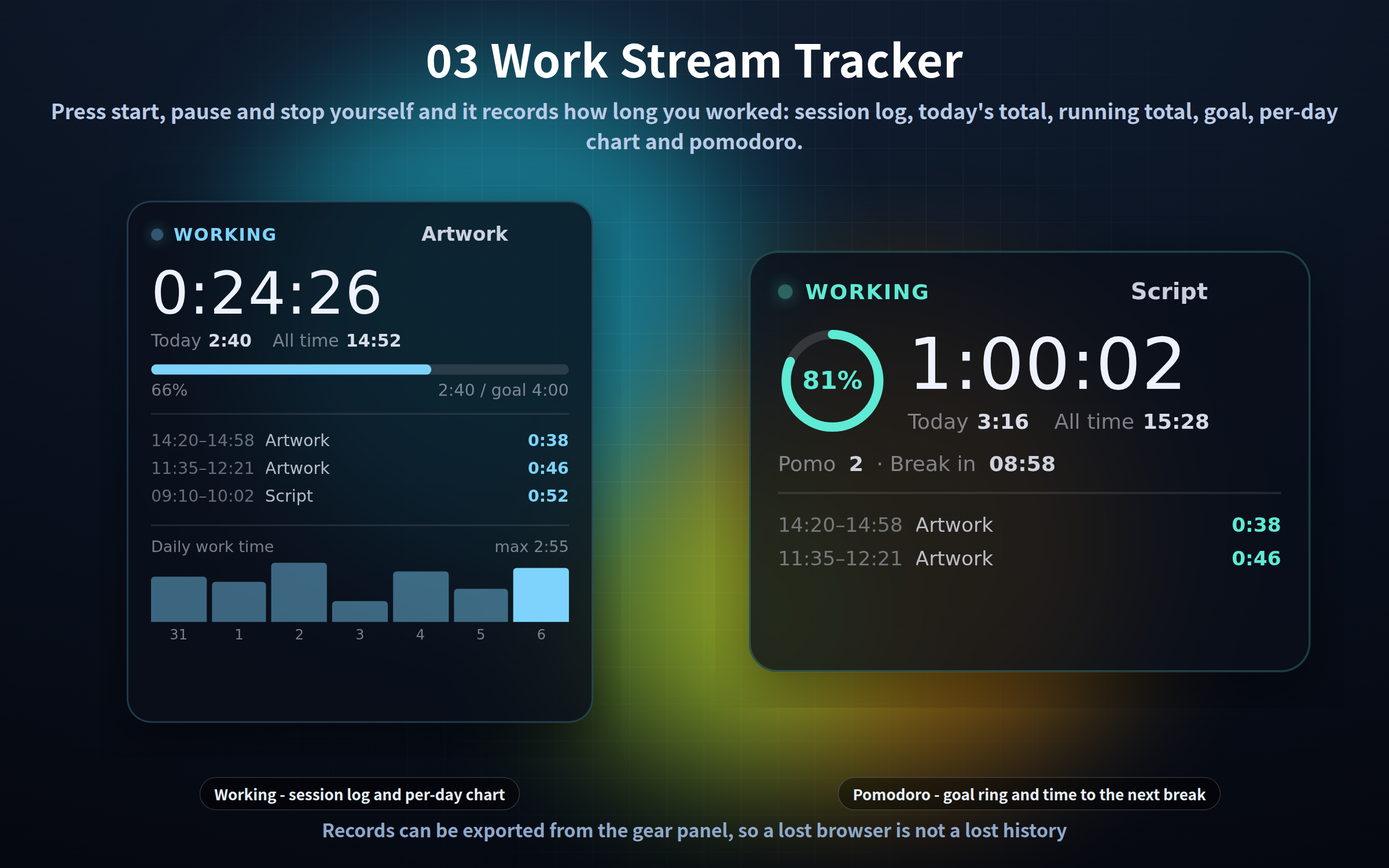
・03 Work Tracker - not what is left, but what you have already put in. Sessions are logged
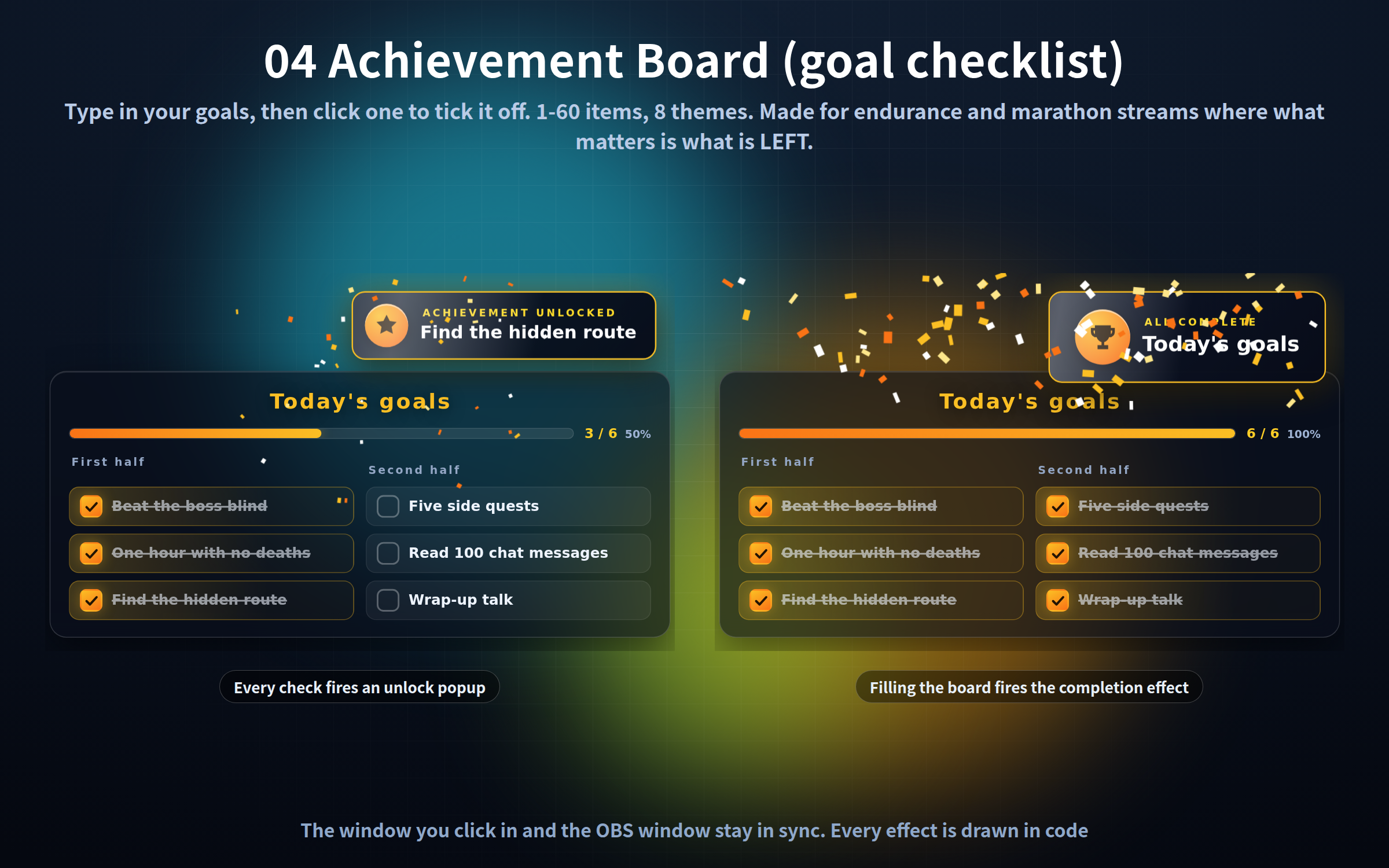
・04 Achievement Board - several things to tick off. For "what is still left", not "what percent"
Standby screens want 01. Endurance runs want 04. Work-along streams want 03. Goal drives want 02.
━━━━━━━━━━━━━━━━━━
What is inside (4 packs / 42 HTML files)
━━━━━━━━━━━━━━━━━━
01_Countdown (20 designs)
Flip board, seven-segment LED, neon rings, frosted glass, minimal line, movie ticket stub, hologram, chalkboard, cyberpunk HUD, florals, constellation, brutalist, half dial, balloons, stadium scoreboard, rocket launch, handwritten note, retro terminal, wax seal, liquid blob.
You set the target date and time, and the message shown at zero.
02_Progress Bars (20 designs)
Classic bar, donut, segmented blocks, liquid tank, thermometer, battery, 8-bit loading bar, hearts, XP bar, dots, coin jar, growing plant, road trip, hourglass, equaliser, constellation, neon tube, scroll, half gauge, brick wall.
You move the value: click, up/down, +/-, left/right, 0 to reset. No outside service is ever read.
03_Work Stream Tracker
Press start, pause, resume and stop yourself, and it records how long you worked: session log, today's total, running total, goal percentage and a per-day bar chart, all on one panel. An optional pomodoro (N minutes of work, M of break) is built in.
Made for work-along, study-along and early-morning streams.
04_Achievement Board (goal checklist)
Type in the goals for your stream, then click one to tick it off. Every check fires an achievement-unlocked popup, and filling the board fires a completion effect. 1-60 items, 8 themes, a line starting with # becomes a heading.
The window you click in and the display window you put in OBS (?mode=stream) stay in sync.
━━━━━━━━━━━━━━━━━━
Setup (30 seconds)
━━━━━━━━━━━━━━━━━━
1. In OBS: Sources -> "+" -> Browser
2. Tick "Local file" and choose the .html you want
3. Enter the width and height (about 700x320 for 01, 480x460 for 02, 300x360 for 03, 700x900 for 04)
The background is transparent, so it sits straight on your scene.
━━━━━━━━━━━━━━━━━━
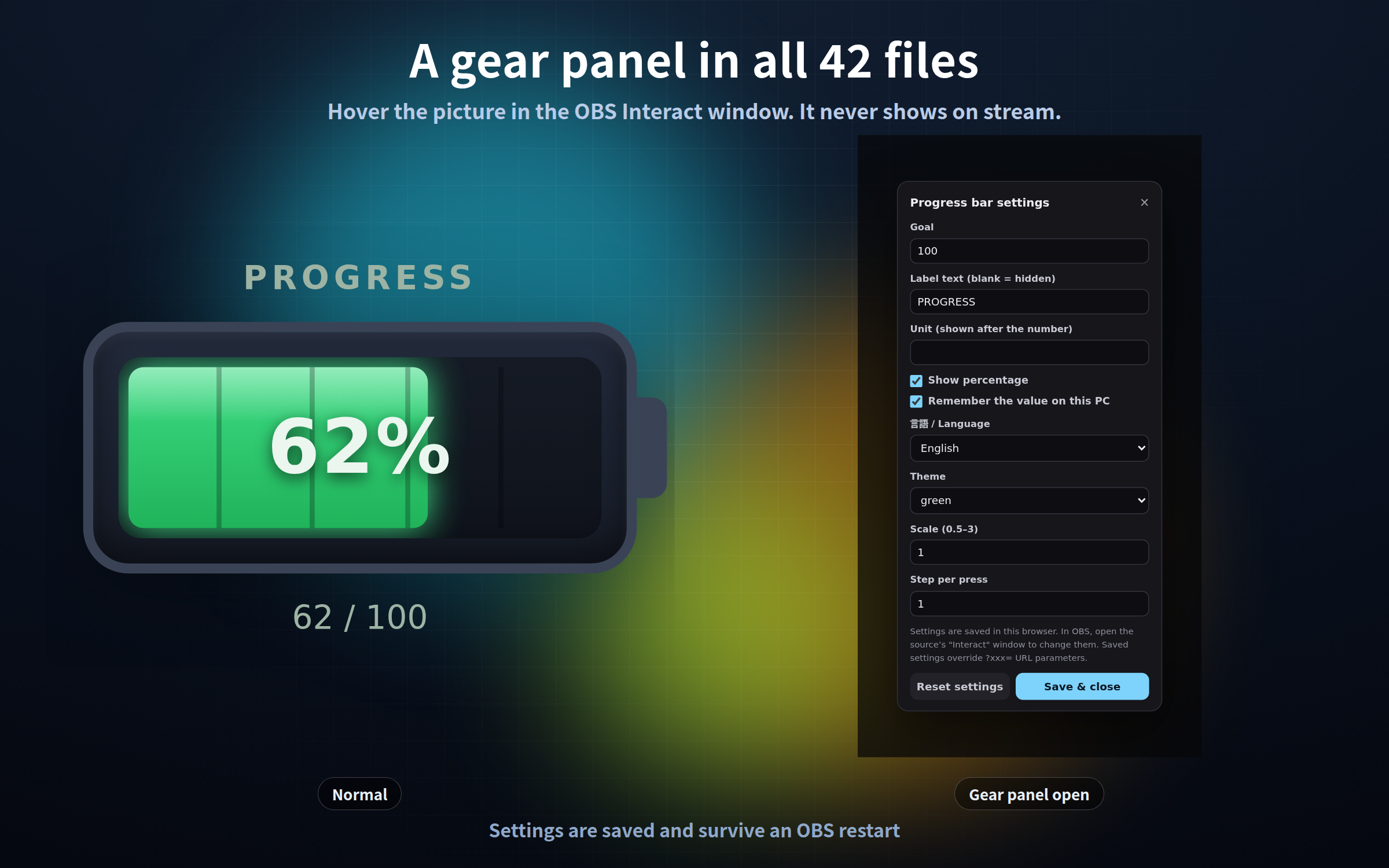
A gear button in all 42 files
━━━━━━━━━━━━━━━━━━
・Right-click the source in OBS, choose "Interact", move the mouse over the picture and a gear appears
・Goals, wording, colours, size and language change without editing a URL
・It is invisible the rest of the time, so it never shows on stream. In packs 01 and 02 you can also press S inside the Interact window; 03 and 04 have no S shortcut (03 shows the gear at the top right when you move the mouse, 04 at the bottom right when you hover the board)
・Settings are saved and survive an OBS restart
・"Reset settings" puts everything back to how it shipped
━━━━━━━━━━━━━━━━━━
Getting your values back if they disappear
━━━━━━━━━━━━━━━━━━
Packs 02, 03 and 04 hold values that build up. They live in that browser's localStorage, so clearing the browser cache or site data clears them - and so does "Delete cache" on an OBS browser source.
・02 - put ?value=0&goal=1000&label=Goal in the URL and that is where it starts when nothing is saved
・03 - "Export / import records" in the gear panel shows your records as JSON and lets you copy them. Keep that JSON in a text file and "Import (replace)" brings it all back. Exporting a backup now and then is well worth it. "Reset settings" never touches your records; only "Delete records" does
・04 - put ?items=Goal 1|Goal 2|Goal 3 in the URL and that is the board you get when nothing is saved. Keep the URL and rebuilding takes seconds
The bundled manual explains all of this in more detail.
━━━━━━━━━━━━━━━━━━
URL parameters
━━━━━━━━━━━━━━━━━━
?lang=ja / ?lang=en Display language (all 42; 02 starts in Japanese if unset, 01/03/04 follow your browser)
?key=a Separate the saved settings, values and records (all 42)
?scale=1.2 Size (all 42)
?mode=stream Transparent, display-only (04 only)
Everything else differs per pack and is listed in each folder's manual.
━━━━━━━━━━━━━━━━━━
What it does not do
━━━━━━━━━━━━━━━━━━
・No sound effects (visual only - nothing ever plays)
・Chat and viewer comments are never read, and never tallied
・No connection to streaming platforms, tips or follower counts
・The value in 02, start/stop in 03 and the checks in 04 are all things you press yourself
・"Elapsed" in 03 counts from when you press Start, not from when your stream or PC started
・04 never clears its checks on its own
・The time comes from your PC clock; no time server is contacted
━━━━━━━━━━━━━━━━━━
If you already own them
━━━━━━━━━━━━━━━━━━
These are the same files as the four items sold separately in this store, unchanged. If you already own one, that part is a duplicate.
━━━━━━━━━━━━━━━━━━
Included
━━━━━━━━━━━━━━━━━━
・4 packs (42 HTML files, one folder each)
・A manual for each pack (Japanese / English)
・A manual for the whole bundle (Japanese / English)
・Terms of use (Japanese / English)
━━━━━━━━━━━━━━━━━━
Requirements
━━━━━━━━━━━━━━━━━━
・Tested in Chrome and Edge. The OBS Studio 28+ browser source is Chromium, so it runs the same way there, and in other apps with a browser source such as Streamlabs
・No internet connection is needed and nothing is ever sent out (no web fonts, no analytics)
・Fonts come from your own PC
・Nothing is a bitmap, so it stays sharp however large you make it
・Each frame is computed from the current time, so memory does not grow when you leave one running all day
・Streaming and commercial use are fine (see the bundled terms)
Purchase
In order to download this tool you must purchase it at or above the minimum price of $3.50 USD. You will get access to the following files:
Leave a comment
Log in with itch.io to leave a comment.